Icon of program: SUPER

SUPER for Windows

  • Free
  • 3.7
    892
  • 355.7K
  • V2021.build.78-3d-recorder

Simplified universal player encoder and renderer

SUPER is a useful media tool that both encodes and renders media files into a variety of different formats.

Top Recommended Alternative

The evolution of computers reveals a trend toward multimedia desktop apps where users can listen to music, watch videos, surf the net, work and view photo albums.If you’ve gotten hold of media files, you’ve probably had to convert the files to transfer them on a different device or in order to play it in another application at one time or another.SUPER makes audio and video conversion a breeze thanks to a well presented interface and a slew of options.

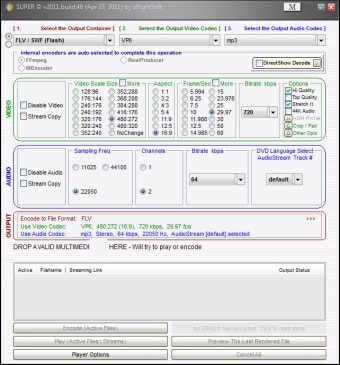
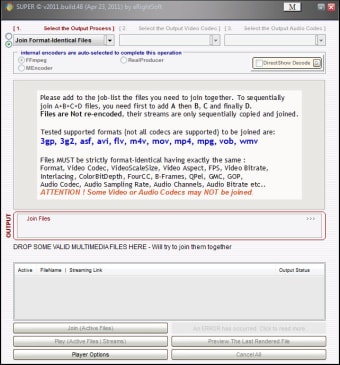
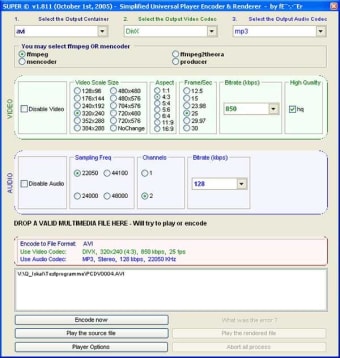
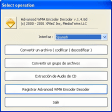
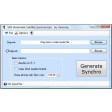
SUPER’s single window interface is divided into audio and video and the selection of output options is done via the three dropdown menus at the top.There are quite a few formats available. SUPER allows you to convert movies and music to play on recent devices such as Apple iPod, Sony PSP and 3gp for use on Sony Ericsson and Nokia mobile phones.The huge bit rate menu, from 64 to 9792 Kbps, means you can truly optimize and quicken the conversion process. Unfortunately, SUPER only offers 2 video codec outputs (H263 and MPEG-4) and 3 audio codecs (AAC, AMR wideband and narrowband).

On the audio side, SUPER allows you to select your language from individual tracks, but audio is limited to one channel and one sampling frequency (8000).It seems SUPER is more suited to video conversion. Luckily SUPER includes recognized encoders such as ff mpeg or mencoder, ensuring a decent conversion process for both audio and video.

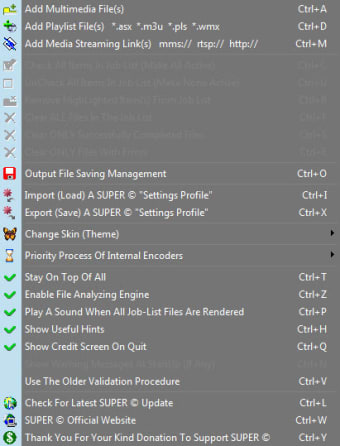
Use the buttons at the bottom of the interface to play files and check their quality after having converted them. The Player Options button gives you the chance to tweak video features such as aspect, saturation, hue, brightness and contrast.All files converted or waiting to be converted are visible in a list and you can verify the streaming link and output status. SUPER is a very open media converter that even the klutziest of users will find easy enough to use.

Changes

[ADD] DVCPRO25 and DVCPRO50 format to the 'DV Digital Video' Output Container [ADD] new settings to render sequentially numbered SGI and TGA files with the 'Sequence Of Images' profile [ADD] support for sequentially numbered SGI, TGA input files [FIX] Video Bitrate for ASF/WMV by lifting limitation from 6000 to 9792 [FIX] Video Bitrate for AVI,MKV,MOV,MP4,MPG,OGG by lifting limitation from 9600 to 9792 [FIX] bug when rendering DVD in AutoMode with .ifo & .bup files


  • Pros

    • Lots of format outputs
    • Choose the best bit rate
    • Tweak player options like aspect or contrast
    • Works with popular encoders
  • Cons

    • Output limited to 2 video codecs and 3 audio codecs
    • Very limited audio conversion
 0/7

App specs

  • License

    Free

  • Version

    2021.build.78-3d-recorder
  • Latest update

  • Platform

    Windows

    Other platforms (1)
  • OS

    Windows 10

  • Language

    English

    Available languages

    • Danish
    • German
    • English
    • Spanish
    • Finnish
    • French
    • Italian
    • Dutch
    • Norwegian
    • Portuguese
    • Swedish
  • Downloads

    355.7K

    Last month's downloads

    • 20
  • Size

    117.69 MB

  • Developer

Also available in other platforms

Program available in other languages


Icon of program: SUPER

SUPER for PC

  • Free
  • 3.7
    892
  • 355.7K
  • V2021.build.78-3d-recorder

User reviews about SUPER

3.7

4 reviews

Add review

Main reviews for you

  • Anonymous user

    Installs malware. The free version includes a downloader that silently installs third party unwanted software, identified as malware by various AV products. There is no user option to decline to install such unwanted software, eRightSoft decided to trade their morals for cash and made their free model a take everything, malware included, or nothing at all scenario. Save yourself the headache and get a better free program. Pros: Used to be a decent program Cons: Needs less malware

  • Anonymous user

    Bloatware alert!. Loaded with bloatware! Choose custom installation! And reject the bloatware.

  • Anonymous user

    Edit. Correction to last review, it does have 3g2, it's just difficult to get it to work without giving me an error message.

  • Anonymous user

    Great!. Great software, converts just about any audio/video format imaginable. Have to be pretty tech savy though to get all of the features. Easy to use once you get the hand of it. Everything I'd ever need in a converter except no 3g2 and most importantly of all, hogs up your cpu usage. If you have an older computer like me, you can't run anything else while it's converting or you'll freeze it up. Pros: Format compatibilityStabilityeasy to installwell-rounded Cons: AppearanceHogs up cpu usage

More

You may also like

Alternatives to SUPER

Explore Apps

Related Articles

Latest articles
Laws concerning the use of this software vary from country to country. We do not encourage or condone the use of this program if it is in violation of these laws.